


Understanding groundtech gr4 dual scan modes can help you decide whether this scanner matches your real search work.
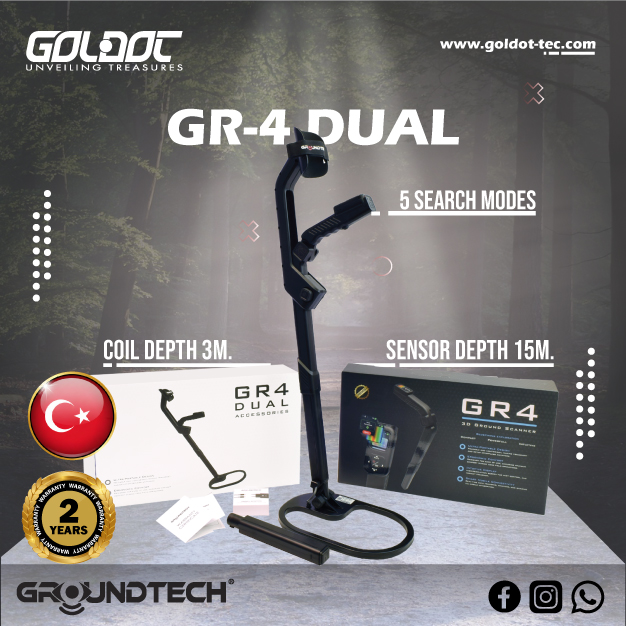
The GR4 Dual combines two main detection approaches in one device. Its 3D ground scanning system examines underground anomalies. Its integrated Pulse Induction system focuses on metallic targets.
That combination gives the operator several ways to examine the same site.
However, more modes do not automatically mean better results. You still need to choose the correct method for each search question.
A fast field check needs a different workflow from a structured 3D survey. Metal detection also requires a different approach from searching for ground anomalies or possible void structures.
Your terrain matters too. Soil conditions, target size, mineralization and operator technique can all affect the response.
For that reason, the best buying decision starts with your intended search method.
You can review GR4 Dual modes on the official product page before ordering. Goldot-Tec can also help you match the device to your targets and normal terrain.
Understand What “Dual” Means on the Groundtech GR4 Dual
The word “Dual” does not mean that GR4 Dual only offers two menu options.
Instead, the device combines two detection technologies.
One side of the system handles 3D ground scanning. The other uses Pulse Induction technology for metal detection.
Groundtech also gives the operator several scanning functions within that wider system.
These include:
- 3D Ground Scanning.
- Live Scanning.
- Pinpointer.
- Detector Quick Scan.
- Detector Advanced Scan.
- 3D Ground Scanning Detector workflow.
Each function answers a different field question.
Separate 3D Scanning From PI Metal Detection
The 3D Ground Scan does not work like a normal PI coil.
Groundtech uses its MFS-2 Dual Sensor system for the ground-scanning workflow. The scanner records changes across the search area. The operator can then examine those results visually.
The Pulse Induction system serves another purpose.
It gives the GR4 Dual a direct metal-detection workflow. This system can help when metallic targets form the main search objective.
Keeping these technologies separate prevents a common buying mistake.
A customer should not expect every scan mode to produce the same type of information.
Match Each GR4 Dual Mode to a Clear Search Question
Before selecting a mode, define what you want to know.
Do not start with the most advanced-looking screen.
Start with a field question.
For example:
- Do I need a fast check of this area?
- Do I need a structured 3D survey?
- Am I searching mainly for metal?
- Do I need to examine a repeated anomaly?
- Do I want to locate the center of a response?
- Does the terrain allow a controlled scan pattern?
Your answer should guide the mode.
Use One Mode for One Clear Purpose
A simple workflow reduces confusion.
You might begin with Live Scan during an initial site check. A repeatable response may justify a detailed 3D scan next.
If the response appears metallic, the PI detector modes can add another type of evidence.
Pinpointer can then help you narrow the location after you identify an area of interest.
This approach uses each mode for a defined task.
It also prevents the operator from switching between modes without a reason.
Use Live Scan for Fast Reconnaissance
Live Scanning gives the operator immediate visual feedback.
This mode suits early site evaluation because it does not require the same structured workflow as a detailed 3D grid.
It can help you move through an area and identify locations that deserve more attention.
Start Broad Before Collecting Detailed Data
Large sites can contain many sections that show no useful response.
A rapid first pass may help you focus your time.
Use Live Scan to examine:
- Changes across the site.
- Areas around known structures.
- Locations with unusual responses.
- Sections that deserve a second method.
- Ground that may require slower investigation.
Do not treat every change on the display as a confirmed target.
Instead, mark interesting locations.
Then return with another scan method.
That process makes Live Scan more useful as a reconnaissance tool.
Treat Live Feedback as a Lead
Immediate feedback can tempt the operator to make a fast conclusion.
Avoid that mistake.
One visual response does not prove that gold, treasure, a tunnel or another specific object lies underground.
Check the location again.
Change the search direction when practical. Compare the response with nearby ground. Use another GR4 Dual function when the signal justifies further investigation.
A commercial scanner should help you make better decisions. It should not encourage unnecessary excavation.
Use 3D Ground Scanning for Structured Survey Work
Detailed 3D scanning requires more discipline than a quick field check.
A structured search area gives the software better context. It also helps you relocate anomalies after analysis.
The operator should plan the grid before collecting the main dataset.
Define the Grid Boundaries First
Mark the beginning and end of the survey area.
Next, decide your scan direction.
Maintain the same direction and technique throughout one dataset. Consistency makes later comparison easier.
Record basic details such as:
- Survey location.
- Start point.
- End point.
- Scan direction.
- Terrain condition.
- Visible obstacles.
- Important surface metal.
- Any interruption during scanning.
These notes can become valuable during analysis.
Without clear field context, an attractive 3D model may still leave you unsure about the exact location.
Keep Your Movement Consistent
Good scan technique matters.
Try to maintain a stable walking rhythm. Avoid sudden changes in direction. Keep your movement controlled across the grid.
Rough ground may require a slower pace.
If an obstacle forces you away from the planned line, record the change. Do not hide poor data behind extra processing later.
A clean survey starts in the field.
Software cannot fully correct an inconsistent scan.
Use Detector Quick Scan for Fast Metal Checks
The GR4 Dual adds an integrated Pulse Induction metal detector to the 3D scanning platform.
Detector Quick Scan gives users a faster way to investigate metallic responses.
This function can add value when the site contains a possible metal target.
Use Quick Scan to Test Marked Locations
Suppose Live Scan or a 3D survey reveals an interesting location.
A PI metal check can answer another question.
Does the same location create a meaningful response through the metal-detection system?
That extra information can improve your next decision.
However, a PI response still does not tell you that the object contains gold.
Ferrous and non-ferrous targets can both create detector responses. Target size and ground conditions also influence performance.
Use the result as another piece of evidence.
Do Not Replace a Full Survey With a Quick Metal Check
Quick scanning serves a specific purpose.
It does not replace structured 3D work when your main goal involves underground anomalies, rooms, cavities or other subsurface changes.
Likewise, a detailed 3D model does not replace PI searching when you mainly want direct metal detection.
This difference makes the GR4 Dual useful for mixed search objectives.
You can change methods without carrying two completely separate systems.
Use Detector Advanced Scan When the Site Needs More Control
Detector Advanced Scan expands the PI workflow.
Groundtech provides this mode for users who need more control over the detector settings and search process.
It suits more demanding metal searches.
Move to Advanced Scan for Difficult Conditions
You may consider Advanced Scan when:
- The ground creates difficult responses.
- You need more control than Quick Scan provides.
- A target deserves a closer metal check.
- Mineralization affects the search.
- The site requires a more careful PI workflow.
Experience becomes more important here.
Advanced settings can help when you understand their purpose. Random adjustments may make interpretation harder.
Beginners should learn a stable basic setup first.
Then they can change settings according to field conditions.
Avoid Chasing Maximum Sensitivity
Higher sensitivity does not always create better search results.
An unstable detector can produce confusing responses.
Aim for useful stability instead.
Test the detector over a small section first. Listen to the response. Watch for environmental interference.
Then enter the main search area.
This workflow can save time and reduce false leads.
Use Pinpointer to Narrow a Confirmed Search Area
Pinpointer serves a different purpose from reconnaissance or 3D mapping.
It helps you narrow the location of a response.
Use it after another method gives you a reason to examine a specific point.
Narrow the Location Before Further Action
Broad scanning can identify an area of interest.
Pinpointing helps you focus that area.
This function becomes useful before another verification step or any excavation decision.
Avoid using Pinpointer as proof of target identity.
Its job centers on location.
A strong point response still needs context from the wider search.
Recheck the Location From Another Direction
Repeatability improves confidence.
Approach the marked area again when terrain allows.
If the response remains in the same location, you gain stronger evidence for further investigation.
If the response disappears completely, review the earlier scan.
Operator movement or environmental conditions may have affected the first result.
Rechecking takes less effort than unnecessary excavation.
Combine GR4 Dual Modes Without Creating False Confidence
Multiple search methods give the GR4 Dual its main commercial advantage.
Still, several colored screens do not automatically confirm a target.
Use the modes to test one another.
Use a Second Method on the Same Marked Location
A practical workflow might look like this:
- Survey the site quickly with Live Scan.
- Mark an unusual response.
- Create a structured 3D scan over that area.
- Review the 3D result.
- Test the location with the PI system when metal may be present.
- Use Pinpointer to narrow the response.
- Repeat the important scan before making a major decision.
You do not need every stage for every site.
Choose the steps that match the search question.
Look for Repeatable Patterns
A useful anomaly should survive reasonable verification.
Ask several questions.
Does it appear during another pass?
Can you relocate it?
Does another scan method support the same area?
Does the response change completely when you reverse direction?
Could visible surface metal explain it?
Does nearby ground show the same pattern?
These checks create a stronger workflow than relying on one dramatic image.
Adapt Your Scan Mode to Difficult Terrain
Real search locations rarely offer perfect ground.
Rocks, slopes, vegetation and debris can affect operator movement.
These conditions can reduce the consistency of a detailed survey.
Slow Down on Uneven Ground
Speed should serve data quality.
Do not maintain a fast pace simply because you want to finish the grid quickly.
Uneven terrain may require shorter sections and slower movement.
Keep control over the sensor.
If one area produces unreliable data, repeat it.
A second clean scan offers more value than a large amount of questionable data.
Switch Methods When the Site Demands It
Some locations make a full structured grid difficult.
Live Scan may offer a more practical first approach.
Other areas allow excellent grid control. Those sites may suit detailed 3D collection.
A suspected metal response may justify moving to the PI detector.
The best operator adapts the workflow instead of forcing one mode onto every site.
This flexibility should influence your buying decision.
If you regularly work across varied terrain, the GR4 Dual may offer more value than a scanner with one narrow search method.
Understand What GR4 Dual Can and Cannot Confirm
Good equipment does not remove uncertainty from underground detection.
Every method has limits.
Results can change because of:
- Target size.
- Target composition.
- Target orientation.
- Soil structure.
- Mineralization.
- Moisture.
- Nearby metal.
- Electromagnetic interference.
- Scan settings.
- Search direction.
- Operator technique.
- Data quality.
That list explains why Goldot-Tec should never promise one fixed detection result for every site.
Treat Color Peaks as Leads, Not Proof
Visual scan software makes underground data easier to examine.
It does not create a photograph of buried objects.
An isolated color concentration may show an anomaly. Several possible causes may explain that anomaly.
Do not automatically call it gold.
Do not automatically call it a cavity.
Instead, compare the response with surrounding data.
Then use another mode when possible.
A repeatable anomaly carries more value than a single attractive image.

Compare GR4 Dual With Other Detector Technologies
GR4 Dual combines 3D ground scanning and Pulse Induction metal detection.
That combination will not suit every buyer.
Sometimes a simpler detector can serve the project better.
GR4 Dual Versus VLF Metal Detectors
VLF systems often suit coin, relic and nugget searches.
Many models offer strong target separation and discrimination.
They also provide a simpler sweeping workflow.
A customer who mainly searches for small surface or near-surface metallic targets may prefer VLF.
GR4 Dual becomes more interesting when the project also requires ground scanning and visual anomaly analysis.
GR4 Dual Versus Standalone Pulse Induction Detectors
A dedicated PI detector focuses heavily on metal detection.
That can make sense for buyers who do not need 3D ground scanning.
GR4 Dual combines PI with additional ground-scanning functions.
Choose the combined system when you expect to use both approaches.
Avoid paying for complexity that your search work never needs.
GR4 Dual Versus Dedicated 3D Imaging Systems
Some scanners focus almost entirely on imaging.
GR4 Dual goes further by adding direct PI metal detection.
That can help users who want to investigate an anomaly and then check the same location for metal.
A dedicated imaging system may still suit specialists who only need a specific sensor workflow.
Compare the complete job rather than one feature.
You can compare 3D imaging systems for underground anomalies before choosing.
GR4 Dual Versus GPR
Ground Penetrating Radar uses radar energy and analyzes subsurface reflections.
GR4 Dual does not turn into GPR because it shows 3D data.
Its 3D scanning system uses Groundtech sensor technology. Its metal detector uses Pulse Induction.
A project that needs radargrams, geological layers or radar-based utility surveying should use a true GPR system.
GR4 Dual Versus Long-Range Systems
Long-range locators follow another search approach.
They target broad-area searching rather than controlled sensor passes over a defined grid.
GR4 Dual works directly across the ground you investigate.
Do not mix these workflows.
Your search area and target type should guide the technology choice.
Who Should Consider Buying the Groundtech GR4 Dual?
GR4 Dual suits buyers who expect to use more than one search method.
Its strongest appeal comes from combining visual ground scanning with direct PI detection.
GR4 Dual Can Fit Mixed Search Projects
Consider the device when you need:
- 3D ground scanning.
- Rapid Live Scan checks.
- Direct Pulse Induction metal detection.
- Detailed PI adjustment.
- Pinpointing.
- Visual anomaly review.
- Different workflows across one project.
- A scanner that can operate with its built-in display.
The device also supports G-Portal analysis for users who want additional mobile 3D/4D review.
Groundtech provides G-Portal for Android and iOS. The GR4 Dual can also work independently through its built-in color display.
That flexibility can help field teams who do not want a phone to control every basic scan.
A Simpler Detector May Suit Some Buyers Better
Do not choose GR4 Dual only because it has many modes.
A VLF detector may suit routine coin hunting better.
A dedicated PI model may serve a metal-only project.
Professional GPR makes more sense for radar surveys.
Another imaging detector may fit a specialist 3D workflow.
Goldot-Tec can compare these options according to your actual project.
You can also see Groundtech scanner options available from Goldot before ordering.
Configure Your GR4 Dual Package With Goldot-Tec
The correct purchase starts with your search environment.
Do not focus only on technical specifications.
Tell Goldot-Tec how you plan to use the scanner.
Share Your Search Requirements Before Ordering
Prepare information about:
- Main target type.
- Typical target size.
- Search-area dimensions.
- Soil conditions.
- Mineralization.
- Terrain.
- Previous detecting experience.
- Need for 3D scanning.
- Need for PI metal detection.
- Mobile analysis requirements.
- Typical field workflow.
These details help the team judge whether GR4 Dual matches your work.
They also make training more useful.
Request Mode-Specific Training
A multi-mode detector provides more value when the operator understands when to change modes.
Ask for guidance on:
- Live Scan workflow.
- 3D grid preparation.
- PI Quick Scan.
- PI Advanced Scan.
- Pinpointer use.
- G-Portal analysis.
- Repeat scans.
- Data review.
Training can also help beginners avoid using every mode at once.
Start with one objective. Select one appropriate method. Verify important responses with another method.
That process creates a cleaner search strategy.
Contact Goldot-Tec to confirm the current package, compatibility and availability before completing your order.
Groundtech GR4 Dual FAQs
Is the Groundtech GR4 Dual suitable for beginners?
Yes, beginners can use the GR4 Dual, but its multiple scan methods require some learning. New users should first understand Live Scan, structured 3D scanning and basic PI detection. Training can shorten that learning process. Goldot-Tec can also help you choose the modes that match your normal targets.
Can GR4 Dual confirm that an anomaly is gold or a buried treasure?
No. A scan response cannot guarantee a specific underground object. Soil, target size, mineralization, settings and operator technique can affect results. Use repeated scans and another appropriate mode before making excavation decisions. Treat visual anomalies as leads that require verification.
Should I buy GR4 Dual instead of a standard GR4?
Choose according to your search work. Standard GR4 focuses on 3D ground scanning, Live Scan and Pinpointer functions. GR4 Dual adds integrated Pulse Induction metal detection with Quick and Advanced detector modes. The Dual version makes more sense when you need both ground imaging and direct metal detection in one field system.
Choose GR4 Dual for the Workflow You Will Actually Use
Understanding groundtech gr4 dual scan modes makes the buying decision much clearer.
The device does not rely on one search method.
Live Scan supports fast reconnaissance. Structured 3D scanning helps you examine a defined area. Pinpointer can narrow an interesting response.
The integrated PI system adds direct metal-detection capability. Quick Scan supports faster checks, while Advanced Scan gives experienced users greater control.
These methods work best when you give each one a clear purpose.
Start broad when the site requires reconnaissance. Move to a structured scan when an area deserves closer study. Add PI detection when the search question involves metal.
Repeat important responses.
Never treat one color, one signal or one depth indication as guaranteed proof of gold, treasure or a specific underground structure.
The GR4 Dual makes the most sense for users who will actually benefit from both 3D scanning and Pulse Induction detection.
If your project only requires one simple detection method, another detector may offer a better fit.
Contact Goldot-Tec with your target type, terrain and normal survey workflow. The team can help you compare GR4 Dual with other Groundtech systems and alternative technologies.
You can also confirm the current package, request mode-specific training and check availability before placing your order Choose the scanner because its workflow matches your search. That decision creates more value than choosing a device simply because it offers the largest number of modes.